Call a Function in a WASM Module to Add One
A lambda may bundle one or more associated WASM modules that will be deployed to agents alongside the lambda. WASM modules may include functions that perform work such as signal processing or evaluation of AI or ML models that are easier to express in a language such as Rust.
This Rust based WASM module aims to demonstrate the simplest possible example by exporting
an add_one() function.
add_one.yaml
add_one.lua
Cargo.toml
src/
  lib.rs
lib.rs:
#![allow(unused)]
fn main() {
#[no_mangle]
pub extern "C" fn add_one(x: i32) -> i32 {
    x + 1
}
}
Cargo.toml:
[package]
name = "add-one"
version = "0.1.0"
edition = "2024"

[lib]
crate-type = ["cdylib"]
Build the WASM module:
$ rustup target add wasm32-unknown-unknown
$ cargo build --target wasm32-unknown-unknown --release
Register the lambda
$ onprem generate xid
cmv805656a11vubtf6pg
# add_one.yaml
id: cmv805656a11vubtf6pg
kind: Lambda
name: add_one
description: >
  A lambda that calls a function in a WASM module to add one.
runAt:
  device:
    deviceId: ci2fabp32ckvhk1g9qe0
fileIds:
  - "@target/wasm32-unknown-unknown/release/add_one.wasm"
scriptContentType: Lua
script: "@add_one.lua"
-- add_one.lua
local wasmer = require('wasmer')

local store = wasmer.Store:default()

local M={}

function M.handler(event, context)
  -- Load module instance, the first time
  if context.instance == nil then
    context['instance'] = M.newInstance(context)
  end
  local instance = context.instance

  -- Invoke
  local add_one_fn = instance.exports:get_function('add_one')
  return add_one_fn:call(store, event)
end

function M.newInstance(context)
  local path = context.pathForFilename('add_one.wasm')
  local f = io.open(path, 'rb')
  local binary = f:read('*a')
  local module = wasmer.Module:from_binary(store, binary)
  local imports = wasmer.Imports:new()
  return wasmer.Instance:new(store, module, imports)
end

return M
$ onprem apply add_one.yaml
If the agent is connected to the control plane, it will have downloaded its new config bundle containing the new lambda and associated WASM module file within a few seconds.
View Lambda in the Console
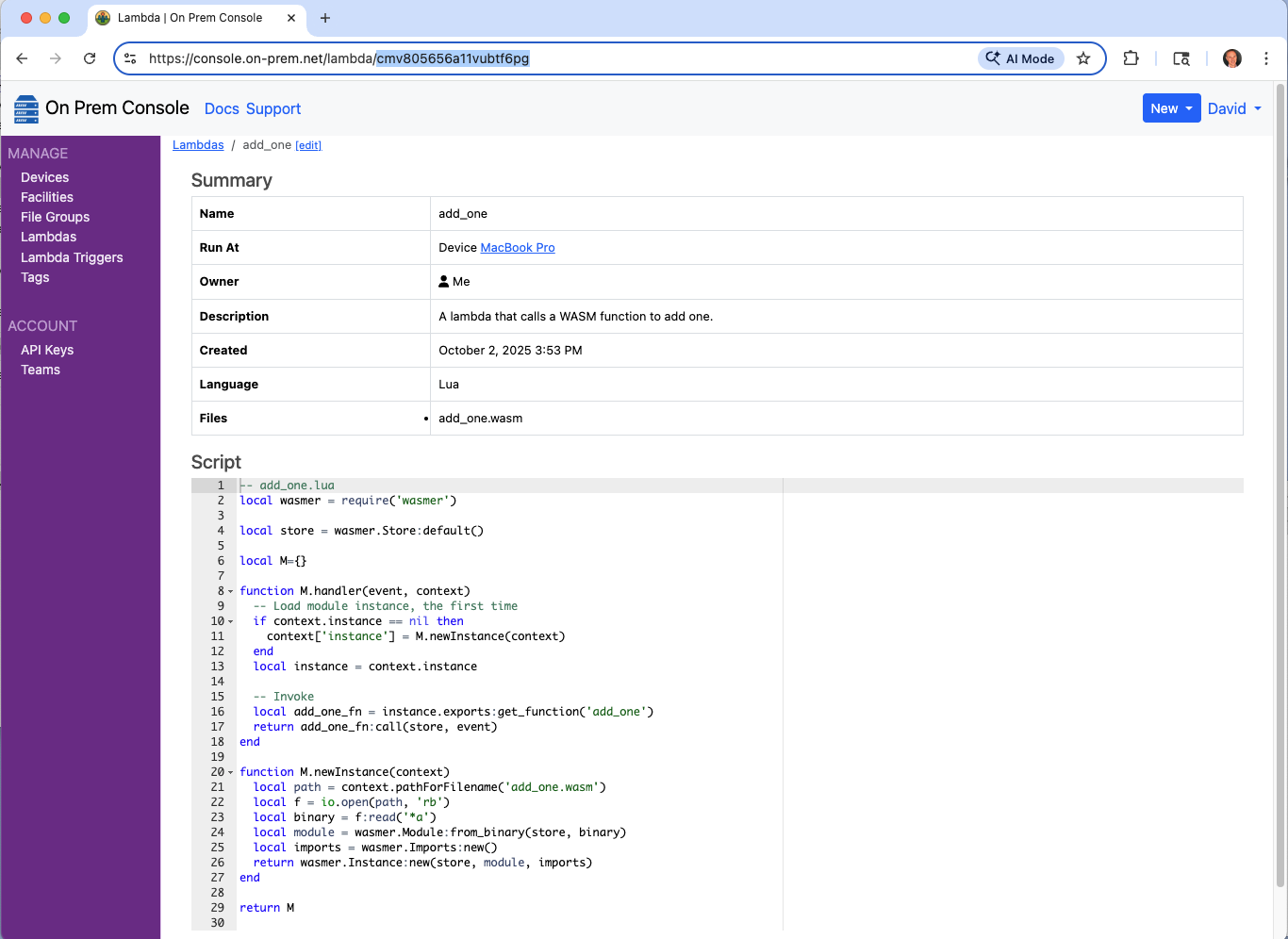
Notice the lambda now appears in the cloud console, and that it contains the associated WASM file add_one.wasm.
Run the Lambda
$ onprem run lambda cmv805656a11vubtf6pg --event '123'
124