Arete Control Plane for Smart Buildings
This example demonstrates use of two Raspberry Pis to simulate two devices within a smart building that make use of the Arete Control Plane to coordinate desired state and actual state.
It reproduces the Arete SDK example called "the switch and the light", by restructuring its flow as Controller control loops and Lambdas.
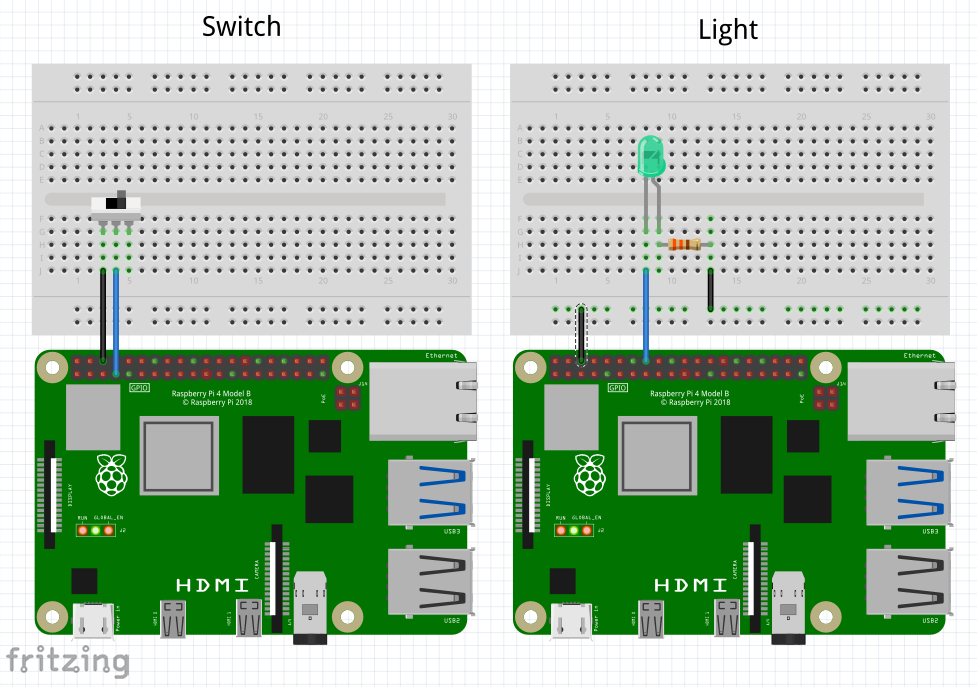
On a 1st node, the On Prem Agent runs "the switch", which consists of:
- a Controller that subscribes to GPIO 04 edge events, and
- a Lambda that translates those events into a new desired state, and publishes it to the Arete control plane.
On a 2nd node, the On Prem Agent runs "the light", which consists of:
- a Controller that subscribes to Arete control plane events containing desired state changes, and
- a Lambda that responds to those desired state change events, and realizes them by setting a GPIO 23 pin, and finally communicating the new actual state back to the Arete Control Plane.
Initial Provisioning
graph LR;

cli --> control_plane;
console --> control_plane;
control_plane <-- tunnel --> agent_1;
control_plane <-- tunnel --> agent_2;

subgraph user_edge[User Edge]
cli[CLI];
console[Console];
end

subgraph cloud[Cloud <small>api.on-prem.net</small>]
control_plane[Control Plane];
end

subgraph device_edge_1[Device Edge]
agent_1[Agent 1];
agent_2[Agent 2];
end
Subsequent Autonomous Edge Operation
graph TB;

switch --> arete_control_plane;
arete_control_plane --> light;

subgraph device_edge[Device Edge]
agent_1;
agent_2;
arete_control_plane;
end

subgraph agent_1[Agent 1]
gpio_04_pin[GPIO 04 pin];
switch[Switch];
gpio_04_pin -- edge trigger --> switch;
end

subgraph agent_2[Agent 2]
gpio_23_pin[GPIO 23 pin];
light[Light];
light --> gpio_23_pin;
end

arete_control_plane[(Arete Control Plane)];
Part 1: The Switch
Define the Controller to detect the GPIO edge triggers
$ onprem generate xid
cj7ca3berad6gieb3rbg
# arete_switch_gpio_controller.yaml
id: cj7ca3berad6gieb3rbg
kind: Controller
name: arete_switch_gpio_controller
description: >
  Detect GPIO edge events, and emit them to a downstream lambda.
scriptContentType: Lua
script: >
  local GPIO = require('periphery.GPIO')

  local M = {}

  function M.init(context)
    -- Configure GPIO 04 pin for input
    local params = {
      path      = '/dev/gpiochip0',
      line      = 4,
      direction = 'in',
      edge      = 'both',
    }
    local pin = GPIO(params)
    context['pin'] = pin
  end

  function M.run(context)
    local pin = context.pin
    while true do
      local event = pin:read_event()
      coroutine.yield(event)
    end
  end

  return M
$ onprem apply ./arete_switch_gpio_controller.yaml
Define the Lambda that will receive the GPIO events, and transmit to Arete
$ onprem generate xid
d322bqpcaq0mr0n3a2bg
# arete_switch.yaml
id: d322bqpcaq0mr0n3a2bg
kind: Lambda
name: arete_switch
description: >
  Respond to GPIO edge events, and transmit as new desired state to the Arete control plane.
triggerId: cj7ca3berad6gieb3rbg
runAt:
  device:
    deviceId: d6mclbipqhcfg04mv0l0 # Raspberry Pi #1
scriptContentType: Lua
script: >
  local NODE_ID = 'ozr9fZbU8i7hMdjEjuTS2o'
  local NODE_NAME = 'On Prem Arete Switch'

  local CONTEXT_ID = 'uRLoYsXEY7nsbs9fRdjM8A'
  local CONTEXT_NAME = 'Building 23, Office 41-B'

  local PADI_LIGHT_PROFILE = 'padi.light'

  local M = {}

  function M.handler(event, context)
    -- Configure Arete context, the first time
    if context.areteContext == nil then
      context['areteContext'] = M.newAreteContext()
    end
    local areteContext = context.areteContext

    -- Transmit new desired state to Arete control plane
    local desiredState = event.edge == 'falling' and '1' or '0'
    local provider = areteContext:provider(PADI_LIGHT_PROFILE)
    provider:put('sOut', desiredState)
  end

  function M.newAreteContext()
    local arete = require('arete-sdk')
    local areteClient = arete.Client:new('wss://dashboard.test.cns.dev:443')
    areteClient:waitForOpen()
    local system = areteClient:system()
    local node = system:node(NODE_ID, NODE_NAME, false)
    local context = node:context(CONTEXT_ID, CONTEXT_NAME)
    return context
  end

  return M
$ onprem apply ./arete_switch.yaml
Part 2: The Light
Define the Controller that will detect changes to desired state
$ onprem generate xid
cj7ca3berad6gieb3rbg
# arete_light_controller.yaml
id: cj7ca3berad6gieb3rbg
kind: Controller
name: arete_light_controller
description: >
  Subscribe to the Arete control plane for the desired state of a light.
scriptContentType: Lua
script: >
  local PADI_LIGHT_PROFILE = 'padi.light'

  local M = {}

  function M.init(context)
    context['areteContext'] = M.newAreteContext()
  end

  function M.run(context)
    local areteContext = context.areteContext
    local consumer = areteContext:consumer(PADI_LIGHT_PROFILE)
    for event, abort in consumer:watch() do
      coroutine.yield(event)
    end
  end

  function M.newAreteContext()
    local arete = require('arete-sdk')

    local NODE_ID = 'onqXVczGoymQkFc3UN6qcM'
    local NODE_NAME = 'On Prem Arete Light'

    local CONTEXT_ID = 'uRLoYsXEY7nsbs9fRdjM8A'
    local CONTEXT_NAME = 'Building 23, Office 41-B'

    local areteClient = arete.Client:new('wss://dashboard.test.cns.dev:443')
    areteClient:waitForOpen()
    local system = areteClient:system()
    local node = system:node(NODE_ID, NODE_NAME)
    local context = node:context(CONTEXT_ID, CONTEXT_NAME)
    return context
  end

  return M
$ onprem apply ./arete_light_controller.yaml
Define the Lambda that will realize the desired state by turning on a light
$ onprem generate xid
d322gs1caq0mvt65gb4g
# arete_light.yaml
id: d322gs1caq0mvt65gb4g
kind: Lambda
name: arete_light
description: >
  Turn on a light.
triggerId: cj7ca3berad6gieb3rbg
runAt:
  device:
    deviceId: d6mclhapqhcfg5ammj1g # Raspberry Pi #2
scriptContentType: Lua
script: >
  local GPIO = require('periphery.GPIO')

  local M = {}

  function M.handler(event, context)
    -- Configure GPIO 23 pin for output, the first time
    if context.pin == nil then
      local params = {
        path      = '/dev/gpiochip0',
        line      = 23,
        direction = 'out',
      }
      local pin = GPIO(params)
      context['pin'] = pin
    end
    local pin = context.pin

    -- Realize the desired state
    local desiredState = event.sState == '1'
    pin:write(desiredState)
  end

  return M
$ onprem apply ./arete_light.yaml